Heem Augmented REality
User Experience design case study for a fictional augmented reality interior design application. One of three final independent study projects for the DesignLab UX Academy program.
Heem is a technology company developing an augmented reality (AR) app that allows users to display and manipulate how 3D models of furniture would look in their home or apartment.
The Problem
Basic UI designs had been created for some parts of the app, but nothing had been developed for the AR environment detection and 3D furniture model placement features, which I was assigned to design.
Market Research
AR is fairly new technology for interior design focused apps so I researched which features, solutions, and problems were common in apps in that already used this technology. Heem had the opportunity to iterate on what came before, and create a product that set itself apart from its competitors.
As a result of my research, I discovered a set of issues :
Scanning the environment to create a placement grid didn’t allow the user to manually adjust the grid in any way, resulting in grids being placed incorrectly or at odd angles
Furniture ends up locked to a strict grid, and results in furniture sometimes not being place-able where a user wants
Contextual menus for changing furniture color and texture in real-time did not exist
Empathy Map
Next, I focused on understanding Heem’s future users. I conducted on online survey through interior design forums, for users who said they had or wanted an app like Heem. Clarifying user goals and frustrations gave me the ability to prioritize Heem’s technical features in a feature roadmap.
Low Fidelity Sketches
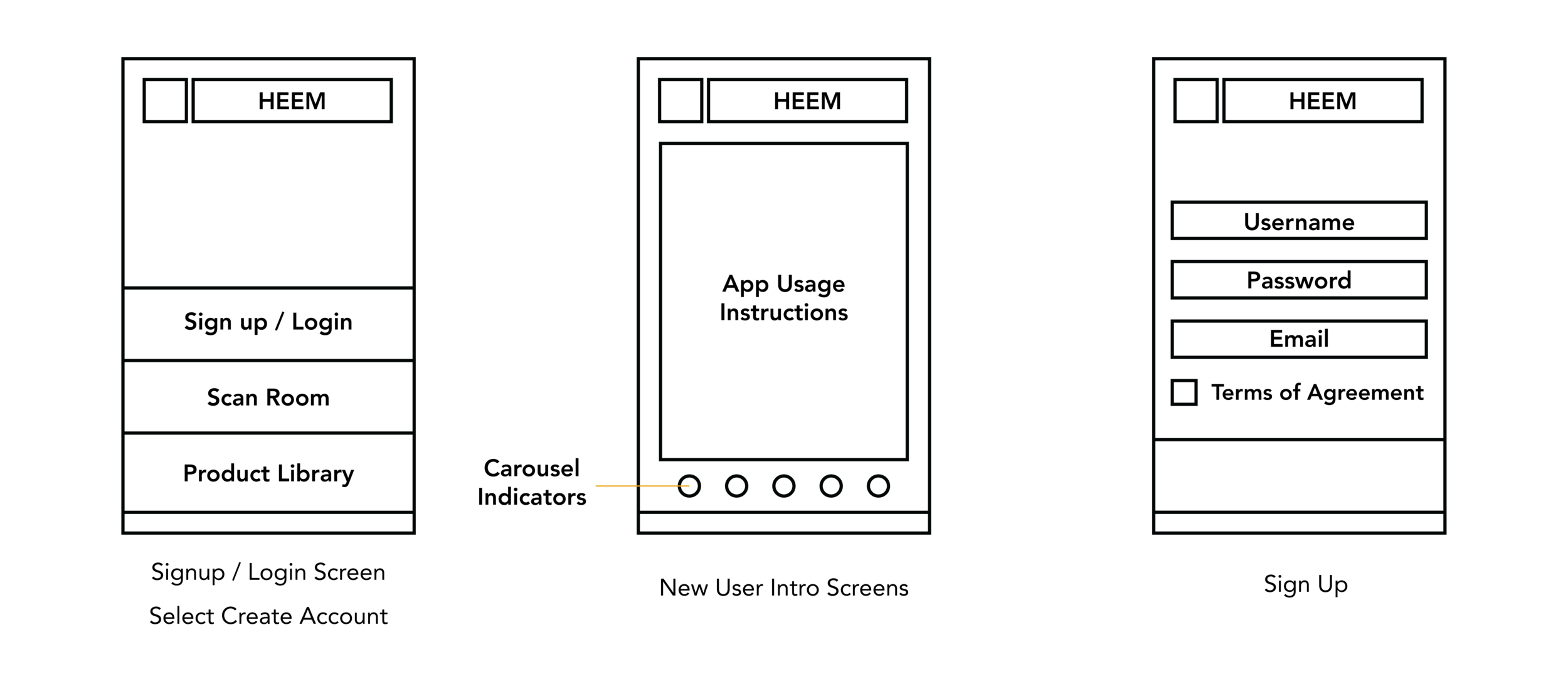
I moved into sketching how Secret 13’s site would be structured to best implement features based on my research :
The homepage is divided into sections, featuring the most recent post / mix / episode for each content category
At the very top of the page, a slider displays featured content which may or may not be the most recent
The menu on desktop, tablet, or mobile should only display no more than 6 items, as any more would create clutter
For radio episodes and mixes the title, music player, and genres all appear first on the page so users know immediately what they are getting into. Detailed information about the content, track-listing, and participants / artists are all below the music player
Feature Roadmap
It was important to decide which technical features to develop first, because of how complicated the app was and Heem’s desire to launch the app quickly. I outlined the top priority features for AR environment detection and 3D furniture model placement.
First Priority Features
As a result of my research, I identified the most important features :
Account creation
Basic tutorial / step list
Scan of the environment for AR furniture placement
Scan of a photo to generate AR environment for furniture placement
Touch controls for moving, rotating, placing furniture items in the 3D environment
Non-touch controls to position objects
Ability to save layouts in your space, bookmark furniture items
Ability to real-time switch materials, colors, and patterns
Ability to search using keywords through available furniture inventory
Navigation for the main functions
In-app secure purchasing catalog
Task Flow
With these features in mind, I defined 3 main tasks :
Account creation / login
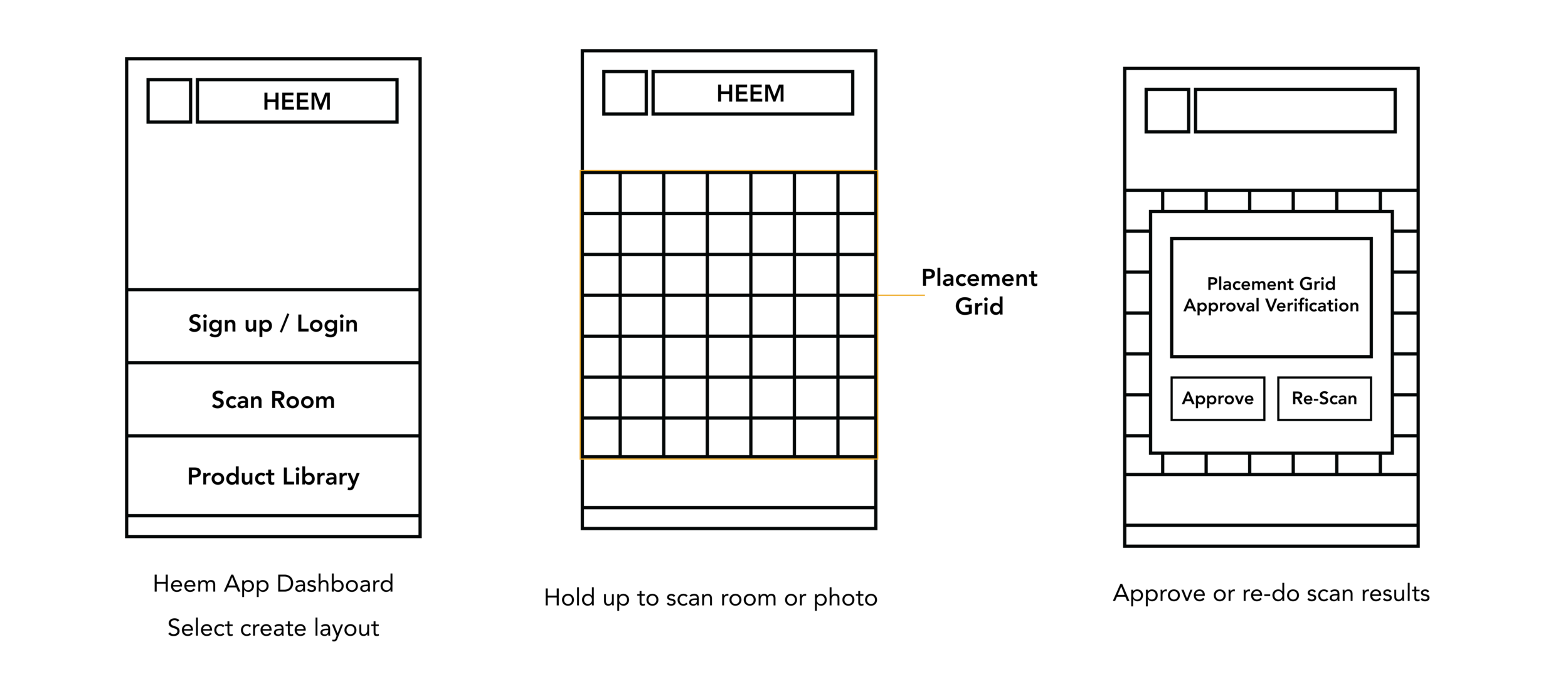
Scanning the environment to create a placement grid
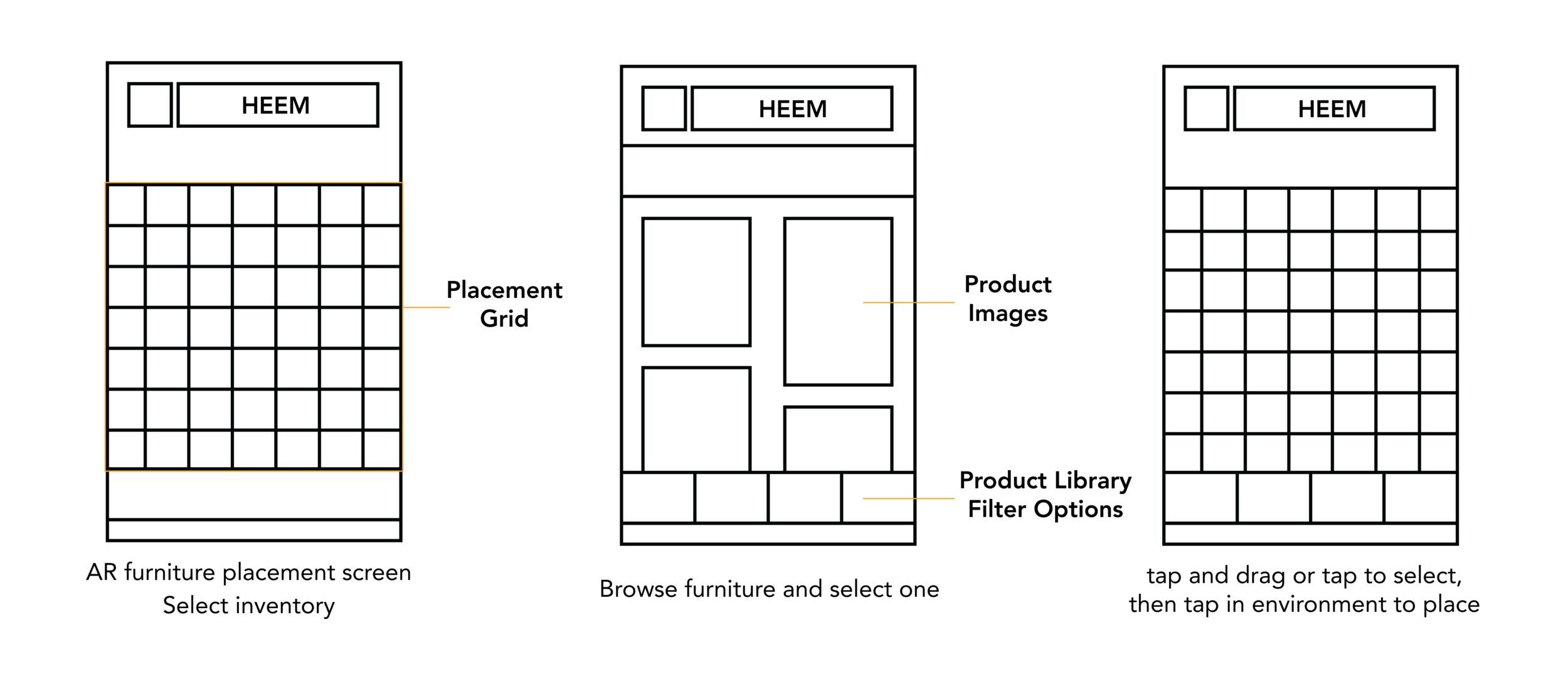
Placing 3D furniture models in the environment
I outlined these task flows, which provided a clear direction for the information architecture and wire-frames.



Final Designs
My research here determined the flow of the most important tasks for Heem users and informed how the rest of the app’s structure should be handled. I expanded and refined the low-fidelity designs into the most important screens for the initial design of Heem :
Homescreen
User introduction / instructional slideshow
New user sign up screen
AR room scanning screen
Furniture product library screen
AR room scan confirmation screen
About Me
The intersection of art and technology fascinates me, and I’ve always been a curious and avid learner hungry for new knowledge. Early pixel pushing in Photoshop and basic HTML / CSS laid the foundation for my exploration across diverse disciplines: graphic design, stop-motion animation, video production, no-code web development, UI/UX design, audio engineering, and artificial intelligence research. Each project, big or small, has been a stepping stone, solidifying the rich skillset and knowledge base I carry today.
In 2023 I joined the Software Development Bootcamp at Coding Dojo, and learned how to translate my design ideas into functional applications. This combination of creative problem-solving, insatiable curiosity, and diverse perspectives allows me to collaborate meaningfully and spearhead innovative design solutions.
What truly excites me? Crafting experiences and solutions that resonate with users, empower their endeavors and make a real difference.

















PREFERRED TECH
Front-End Development:
HTML5, CSS3 (including frameworks like Bootstrap), JavaScript (ES6+), React/Vue.js, Next.js, PrismicDesign Thinking:
User research, persona development, problem framing, ideation, prototypingUX/UI Design:
Information architecture, wireframing, interaction design, visual designDesign Systems:
Creating and implementing design systems for consistency and efficiencyBranding:
Brand strategy, brand identity development, brand experience designSoftware Tools:
Adobe Creative Suite (Photoshop, Illustrator, InDesign), Figma, prototyping tools, Git, version controlCollaboration:
Cross-functional collaboration, stakeholder management, communication, presentation skills
SKILLS
Accomplishments
— Bachelor's Degree in Graphic Design from The Art Institute of Portland, Oregon
— Certification in UX Design from DesignLab
— Pursued a Master of Business for 1 year at the City University of Seattle
— Full-Stack Software Development Bootcamp at Coding Dojo
— Years of shared experience in Graphic Design, Web Development, UI / UX Design, and Design Consultation